Create Statistical Tables
Introduction to gtsummary
Next, we’ll go back to the smartpill dataset and use the gtsummary package, an extension of the gt table formatting package, that can incorporate statistical model outputs into publication-ready tables.
Descriptive statistics
The base R approach to getting summary statistics for a dataframe results in a thorough, but not well-formatted for publication, table.
summary(smartpill) Group Gender Race Height Weight
0: 8 Min. :0.0000 Min. :1.00 Min. :132.1 Min. : 44.91
1:87 1st Qu.:0.0000 1st Qu.:1.00 1st Qu.:164.5 1st Qu.: 66.68
Median :1.0000 Median :1.00 Median :175.3 Median : 74.84
Mean :0.5684 Mean :1.46 Mean :172.0 Mean : 77.47
3rd Qu.:1.0000 3rd Qu.:2.00 3rd Qu.:180.3 3rd Qu.: 86.18
Max. :1.0000 Max. :5.00 Max. :193.0 Max. :127.01
NA's :8
Age GE.Time SB.Time C.Time
Min. :18.00 Min. : 1.680 Min. : 1.810 Min. : 0.70
1st Qu.:28.00 1st Qu.: 2.540 1st Qu.: 3.220 1st Qu.: 15.24
Median :37.00 Median : 3.150 Median : 3.775 Median : 21.66
Mean :37.48 Mean : 5.462 Mean : 4.297 Mean : 27.51
3rd Qu.:44.00 3rd Qu.: 4.120 3rd Qu.: 4.850 3rd Qu.: 37.18
Max. :72.00 Max. :74.300 Max. :13.800 Max. :118.87
NA's :3 NA's :5 NA's :13
WG.Time S.Contractions S.Sum.of.Amplitudes S.Mean.Peak.Amplitude
Min. : 5.99 Min. : 47.0 Min. : 655.6 Min. : 4.553
1st Qu.: 22.42 1st Qu.: 115.0 1st Qu.: 2648.2 1st Qu.:19.436
Median : 30.05 Median : 179.0 Median : 4141.0 Median :21.277
Mean : 58.13 Mean : 260.1 Mean : 5548.1 Mean :22.838
3rd Qu.: 51.22 3rd Qu.: 305.0 3rd Qu.: 6237.8 3rd Qu.:25.021
Max. :816.00 Max. :1665.0 Max. :33800.3 Max. :43.439
NA's :1 NA's :14 NA's :14 NA's :14
S.Mean.pH SB.Contractions SB.Sum.of.Amplitudes SB.Mean.Peak.Amplitude
Min. :1.470 Min. : 223.0 Min. : 3899 Min. :14.98
1st Qu.:2.380 1st Qu.: 468.0 1st Qu.: 7848 1st Qu.:16.78
Median :2.960 Median : 715.0 Median :13305 Median :18.29
Mean :3.023 Mean : 734.9 Mean :13878 Mean :18.75
3rd Qu.:3.600 3rd Qu.: 917.5 3rd Qu.:18392 3rd Qu.:20.10
Max. :5.930 Max. :2375.0 Max. :41123 Max. :27.85
NA's :14 NA's :16 NA's :16 NA's :16
SB.Mean.pH Colon.Contractions Colon.Sum.of.Amplitudes
Min. :4.720 Min. : 41.0 Min. : 1873
1st Qu.:6.815 1st Qu.: 290.5 1st Qu.: 12391
Median :7.040 Median : 598.0 Median : 24832
Mean :6.980 Mean : 688.2 Mean : 30126
3rd Qu.:7.230 3rd Qu.: 894.5 3rd Qu.: 40168
Max. :8.550 Max. :2672.0 Max. :117708
NA's :16 NA's :16 NA's :16
C.Mean.Peak.Amplitude C.Mean.pH
Min. :32.82 Min. :3.920
1st Qu.:38.50 1st Qu.:6.665
Median :41.15 Median :7.070
Mean :42.71 Mean :6.919
3rd Qu.:45.50 3rd Qu.:7.315
Max. :64.22 Max. :8.100
NA's :16 NA's :16 The equivalent summary statistics function from gtsummary is tbl_summary().
tbl_summary(smartpill) | Characteristic | N = 951 |
|---|---|
| Group | |
| 0 | 8 (8.4%) |
| 1 | 87 (92%) |
| Gender | 54 (57%) |
| Race | |
| 1 | 64 (74%) |
| 2 | 12 (14%) |
| 3 | 6 (6.9%) |
| 4 | 4 (4.6%) |
| 5 | 1 (1.1%) |
| Unknown | 8 |
| Height | 175 (164, 180) |
| Weight | 75 (66, 86) |
| Age | 37 (28, 44) |
| GE.Time | 3.2 (2.5, 4.1) |
| Unknown | 3 |
| SB.Time | 3.78 (3.21, 4.85) |
| Unknown | 5 |
| C.Time | 22 (15, 37) |
| Unknown | 13 |
| WG.Time | 30 (22, 51) |
| Unknown | 1 |
| S.Contractions | 179 (115, 305) |
| Unknown | 14 |
| S.Sum.of.Amplitudes | 4,141 (2,648, 6,238) |
| Unknown | 14 |
| S.Mean.Peak.Amplitude | 21.3 (19.4, 25.0) |
| Unknown | 14 |
| S.Mean.pH | 2.96 (2.38, 3.60) |
| Unknown | 14 |
| SB.Contractions | 715 (454, 923) |
| Unknown | 16 |
| SB.Sum.of.Amplitudes | 13,305 (7,639, 18,496) |
| Unknown | 16 |
| SB.Mean.Peak.Amplitude | 18.29 (16.76, 20.14) |
| Unknown | 16 |
| SB.Mean.pH | 7.04 (6.80, 7.23) |
| Unknown | 16 |
| Colon.Contractions | 598 (289, 919) |
| Unknown | 16 |
| Colon.Sum.of.Amplitudes | 24,832 (12,110, 40,580) |
| Unknown | 16 |
| C.Mean.Peak.Amplitude | 41 (38, 46) |
| Unknown | 16 |
| C.Mean.pH | 7.07 (6.66, 7.33) |
| Unknown | 16 |
| 1 n (%); Median (Q1, Q3) | |
Change default descriptive values
The default summary statistic presented depends on variable type. Categorical variables get ‘counts (percent)’ while continuous variables get ‘median(first quartile, third quartile)’. Any NA values are listed in a separate row as “unknown”.
These defaults are customizable. For instance, if we wanted only a subset of variables:
smartpill %>%
  tbl_summary(
    include = c(Group, Age, SB.Time, WG.Time)
)| Characteristic | N = 951 |
|---|---|
| Group | |
| 0 | 8 (8.4%) |
| 1 | 87 (92%) |
| Age | 37 (28, 44) |
| SB.Time | 3.78 (3.21, 4.85) |
| Unknown | 5 |
| WG.Time | 30 (22, 51) |
| Unknown | 1 |
| 1 n (%); Median (Q1, Q3) | |
Or if we wanted to display continuous variables as minimum, median, and maximum:
smartpill %>%
  tbl_summary(
    include = c(Group, Age, SB.Time, WG.Time),
    statistic = list(
      #change just way continuous vars are presented
      all_continuous() ~ "{median} ({min}, {max})"
    )
)| Characteristic | N = 951 |
|---|---|
| Group | |
| 0 | 8 (8.4%) |
| 1 | 87 (92%) |
| Age | 37 (18, 72) |
| SB.Time | 3.78 (1.81, 13.80) |
| Unknown | 5 |
| WG.Time | 30 (6, 816) |
| Unknown | 1 |
| 1 n (%); Median (Min, Max) | |
Variable labels and NAs
This table can also be customized with better labels for rows (variables) and updated NA indicator:
smartpill %>%
  tbl_summary(
    include = c(Group, Age, SB.Time, WG.Time),
    statistic = list(
      #change just way continuous vars are presented
      all_continuous() ~ "{median} ({min}, {max})"
    ),
    #update row labels
    label = list(Group = "Patient Group",
                 SB.Time = "Small bowel transit time (hours)",
                 WG.Time = "Whole gut time (hours)"),
    #change text for NA values
    missing_text = "Missing"
)| Characteristic | N = 951 |
|---|---|
| Patient Group | |
| 0 | 8 (8.4%) |
| 1 | 87 (92%) |
| Age | 37 (18, 72) |
| Small bowel transit time (hours) | 3.78 (1.81, 13.80) |
| Missing | 5 |
| Whole gut time (hours) | 30 (6, 816) |
| Missing | 1 |
| 1 n (%); Median (Min, Max) | |
Note that if we want to change any categorical/character variable values, this needs to be done outside tbl_summary(). Example process to reset factor level names of Group variable:
#check existing levels
levels(smartpill$Group)
[1] "0" "1"#count of each level
summary(smartpill$Group) 0 1
8 87 #relace level values
levels(smartpill$Group) <- c("Critically Ill", "Healthy")#confirm accurate counts
summary(smartpill$Group)Critically Ill Healthy
8 87 smartpill %>%
tbl_summary(
include = c(Group, Age, SB.Time, WG.Time),
statistic = list(
all_continuous() ~ "{median} ({min}, {max})"
),
label = list(Group = "Patient Group",
SB.Time = "Small bowel transit time (hours)",
WG.Time = "Whole gut time (hours)"),
missing_text = "Missing"
)| Characteristic | N = 951 |
|---|---|
| Patient Group | |
| Critically Ill | 8 (8.4%) |
| Healthy | 87 (92%) |
| Age | 37 (18, 72) |
| Small bowel transit time (hours) | 3.78 (1.81, 13.80) |
| Missing | 5 |
| Whole gut time (hours) | 30 (6, 816) |
| Missing | 1 |
| 1 n (%); Median (Min, Max) | |
Crosstabs and column names
This structure can be extended to produce crosstab tables, for instance with descriptive statistics for selected variables for each group
smartpill %>%
  tbl_summary(
    by = Group,
    include = c(Age, SB.Time, WG.Time),
    statistic = list(
      #change just way continuous vars are presented
      all_continuous() ~ "{median} ({min}, {max})"
    ),
    label = list(SB.Time = "Small bowel transit time (hours)",
                 WG.Time = "Whole gut time (hours)"),
    missing_text = "Missing"
)| Characteristic | Critically Ill N = 81 |
Healthy N = 871 |
|---|---|---|
| Age | 41 (23, 57) | 35 (18, 72) |
| Small bowel transit time (hours) | 6.70 (3.40, 13.80) | 3.75 (1.81, 13.45) |
| Missing | 1 | 4 |
| Whole gut time (hours) | 240 (120, 816) | 28 (6, 128) |
| Missing | 0 | 1 |
| 1 Median (Min, Max) | ||
Note: Warnings will be returned if the metrics are not workable, for instance if all instances in a group are not missing. If we created this table with variable ‘SB.Contractions’, we would see NaN values and -Inf as outputs:
smartpill %>%
  tbl_summary(
    by = Group,
    include = c(Age, SB.Contractions, WG.Time),
    statistic = list(
      #change just way continuous vars are presented
      all_continuous() ~ "{median} ({min}, {max})"
    ),
    label = list(SB.Time = "Small bowel transit time (hours)",
                 WG.Time = "Whole gut time (hours)"),
    missing_text = "Missing"
  )
The following warnings were returned during `tbl_summary()`:
! For variable `SB.Contractions` (`Group = "Critically Ill"`) and "min"
statistic: no non-missing arguments to min; returning Inf
! For variable `SB.Contractions` (`Group = "Critically Ill"`) and "max"
statistic: no non-missing arguments to max; returning -Inf| Characteristic | Critically Ill N = 81 |
Healthy N = 871 |
|---|---|---|
| Age | 41 (23, 57) | 35 (18, 72) |
| SB.Contractions | NA (Inf, -Inf) | 715 (223, 2,375) |
| Missing | 8 | 8 |
| Whole gut time (hours) | 240 (120, 816) | 28 (6, 128) |
| Missing | 0 | 1 |
| 1 Median (Min, Max) | ||
If needed, column names can be updated.
smartpill %>%
  mutate(Group = as.factor(Group)) %>%
  tbl_summary(
    by = Group,
    include = c(Age, SB.Time, WG.Time),
    statistic = list(
      #change just way continuous vars are presented
      all_continuous() ~ "{median} ({min}, {max})"
    ),
    label = list(SB.Time = "Small bowel transit time (hours)",
                 WG.Time = "Whole gut time (hours)"),
    missing_text = "Missing"
  ) %>%
  #show existing column headers of this table
  show_header_names()
Column Name Header level* N* n* p*
label "**Characteristic**" 95 <int>
stat_1 "**Critically Ill** \nN = 8" Critically Ill <chr> 95 <int> 8 <int> 0.084 <dbl>
stat_2 "**Healthy** \nN = 87" Healthy <chr> 95 <int> 87 <int> 0.916 <dbl> * These values may be dynamically placed into headers (and other locations).
ℹ Review the `modify_header()` (`?gtsummary::modify_header()`) help for
examples.smartpill %>%
tbl_summary(
by = Group,
include = c(Age, SB.Time, WG.Time),
statistic = list(
#change just way continuous vars are presented
all_continuous() ~ "{median} ({min}, {max})"
),
label = list(SB.Time = "Small bowel transit time (hours)",
WG.Time = "Whole gut time (hours)"),
missing_text = "Missing"
) %>%
#modify column header text and make bold with **
modify_header(label = "**Variable**",
stat_1 = "**Critically Ill Trauma Patients**",
stat_2 = "**Healthy Volunteers**")| Variable | Critically Ill Trauma Patients1 | Healthy Volunteers1 |
|---|---|---|
| Age | 41 (23, 57) | 35 (18, 72) |
| Small bowel transit time (hours) | 6.70 (3.40, 13.80) | 3.75 (1.81, 13.45) |
| Missing | 1 | 4 |
| Whole gut time (hours) | 240 (120, 816) | 28 (6, 128) |
| Missing | 0 | 1 |
| 1 Median (Min, Max) | ||
Before we move on to the next section, let’s assign our current table to an object to make it easier downstream to see what code is being added.
Table1 <- smartpill %>%
  tbl_summary(
    by = Group,
    include = c(Age, SB.Time, WG.Time),
    statistic = list(
      #change just way continuous vars are presented
      all_continuous() ~ "{median} ({min}, {max})"
    ),
    label = list(SB.Time = "Small bowel transit time (hours)",
                 WG.Time = "Whole gut time (hours)"),
    missing_text = "Missing"
  ) %>%
  #modify column header text and make bold with **
  modify_header(label = "**Variable**",
                stat_1 = "**Critically Ill Trauma Patients**",
                stat_2 = "**Healthy Volunteers**")
Statistical tests
If we wanted to run statistical analyses on this data, a usual approach would be to use a separate R package to run the test and then extract values of interest, like coefficients and p-values, to put into a table. gtsummary streamlines this process with an all-in-one approach to formatting statistical test outputs into a table.
There are many standard statistical tests integrated into gtsummary including t-test, ANOVA, chi-square, regression, survey sample methods, and more.
Let’s look at a couple examples in practice.
Comparing small bowel transit time and whole gut time bewteen the two groups:
Table1 %>%
  #add p-value
add_p()| Variable | Critically Ill Trauma Patients1 | Healthy Volunteers1 | p-value2 |
|---|---|---|---|
| Age | 41 (23, 57) | 35 (18, 72) | 0.4 |
| Small bowel transit time (hours) | 6.70 (3.40, 13.80) | 3.75 (1.81, 13.45) | 0.010 |
| Missing | 1 | 4 | |
| Whole gut time (hours) | 240 (120, 816) | 28 (6, 128) | <0.001 |
| Missing | 0 | 1 | |
| 1 Median (Min, Max) | |||
| 2 Wilcoxon rank sum test | |||
Caveats
Default tests will vary based on data type.
Since we did not define a specific test to use, add_p() used the default tests, which depend on whether the data is continuous or categorical, how many categories, etc. The test used is always noted at the bottom of the table.
The default test used in add_p() primarily depends on these factors:
- whether the variable is categorical/dichotomous vs continuous
- number of levels in the tbl_summary(by) variable
- whether the add_p(group) argument is specified
- whether the add_p(adj.vars) argument is specified
In this case, the variable being compared was continuous and the grouping variable had two levels, so Wilcoxon rank sum test was used.
If for any reason you want to override the default test, you can specify a different test within the add_p() function.
Table1 %>%
  #add p-value, override default to specify which test to use for Age (here, a t-test)
add_p(test = Age ~ "t.test")| Variable | Critically Ill Trauma Patients1 | Healthy Volunteers1 | p-value2 |
|---|---|---|---|
| Age | 41 (23, 57) | 35 (18, 72) | 0.5 |
| Small bowel transit time (hours) | 6.70 (3.40, 13.80) | 3.75 (1.81, 13.45) | 0.010 |
| Missing | 1 | 4 | |
| Whole gut time (hours) | 240 (120, 816) | 28 (6, 128) | <0.001 |
| Missing | 0 | 1 | |
| 1 Median (Min, Max) | |||
| 2 Welch Two Sample t-test; Wilcoxon rank sum test | |||
Further customization
For some customization, we’ll need to convert our gtsummary object to a gt object with the as_gt() function.
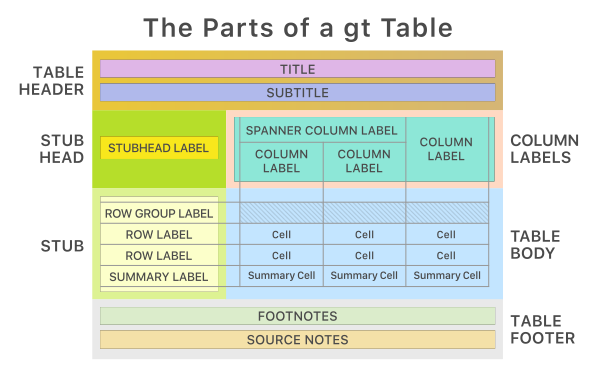
For instance, to update the footnote to clarify which test was used on which variable.
Table1 %>%
  add_p(test = Age ~ "t.test") %>%
  #convert to gt object keeping everything except the existing footnotes
  as_gt(include = -tab_footnote) %>%
  #add new footnote specifying which test used for which variable
  tab_footnote(footnote = "t.test for Age; Wilcox rank sum for others",
locations = cells_column_labels(columns = c(p.value)))| Variable | Critically Ill Trauma Patients | Healthy Volunteers | p-value1 |
|---|---|---|---|
| Age | 41 (23, 57) | 35 (18, 72) | 0.5 |
| Small bowel transit time (hours) | 6.70 (3.40, 13.80) | 3.75 (1.81, 13.45) | 0.010 |
| Missing | 1 | 4 | |
| Whole gut time (hours) | 240 (120, 816) | 28 (6, 128) | <0.001 |
| Missing | 0 | 1 | |
| 1 t.test for Age; Wilcox rank sum for others | |||
Or to add a title and/or subtitle to the table:
Table1 %>%
  add_p(test = Age ~ "t.test") %>%
  as_gt(include = -tab_footnote) %>%
  tab_footnote(footnote = "t.test for Age; Wilcox rank sum for others",
               locations = cells_column_labels(columns = c(p.value))) %>%
  #add table title and subtitle
  tab_header(title = "Table 1",
subtitle = "smartpill dataset")| Table 1 | |||
| smartpill dataset | |||
| Variable | Critically Ill Trauma Patients | Healthy Volunteers | p-value1 |
|---|---|---|---|
| Age | 41 (23, 57) | 35 (18, 72) | 0.5 |
| Small bowel transit time (hours) | 6.70 (3.40, 13.80) | 3.75 (1.81, 13.45) | 0.010 |
| Missing | 1 | 4 | |
| Whole gut time (hours) | 240 (120, 816) | 28 (6, 128) | <0.001 |
| Missing | 0 | 1 | |
| 1 t.test for Age; Wilcox rank sum for others | |||
As with plots, there are many options for table styling: 36 combinations of style and color to choose from plus conditional cell formatting
Table1 %>%
  add_p(test = Age ~ "t.test") %>%
  as_gt(include = -tab_footnote) %>%
  tab_footnote(footnote = "t.test for Age; Wilcox rank sum for others",
               locations = cells_column_labels(columns = c(p.value))) %>%
  tab_header(title = "Table 1",
             subtitle = "smartpill dataset") %>%
  #styling function
opt_stylize(style = 6, color = 'gray')| Table 1 | |||
| smartpill dataset | |||
| Variable | Critically Ill Trauma Patients | Healthy Volunteers | p-value1 |
|---|---|---|---|
| Age | 41 (23, 57) | 35 (18, 72) | 0.5 |
| Small bowel transit time (hours) | 6.70 (3.40, 13.80) | 3.75 (1.81, 13.45) | 0.010 |
| Missing | 1 | 4 | |
| Whole gut time (hours) | 240 (120, 816) | 28 (6, 128) | <0.001 |
| Missing | 0 | 1 | |
| 1 t.test for Age; Wilcox rank sum for others | |||
Saving tables
The function gtsave() is the parallel table save function to ggsave() for plots.
#assign updates to Table1 object
Table1_save <- Table1 %>%
          add_p(test = Age ~ "t.test") %>%
          as_gt(include = -tab_footnote) %>%
          tab_footnote(footnote = "t.test for Age; Wilcox rank sum for others",
                       locations = cells_column_labels(columns = c(p.value))) %>%
          tab_header(title = "Table 1",
                     subtitle = "smartpill dataset") %>%
          opt_stylize(style = 6, color = 'gray')
Specify object, filename, and path (if necessary, defaults to current working directory). Options for output format are .html, .tex, .ltx, .rtf, .docx.
Example saving as Word file:
gtsave(data = Table1_save, filename = "Table1.docx")Caveat: Word files sometimes struggle to retain proper color formatting.
Saving a PNG is possible - it results in a cropped image of an HTML table. The amount of whitespace can be set with the expand option.
gtsave(data = Table1_save, filename = "Table1.png", expand = 5)Note: You may get a warning ‘The package “webshot2” is required to save gt tables as images.’ R will prompt you to install webshot2 if you want to save images of tables like this.
Additional resources
- Primary website for gtsummary including how to cite use of the package.
- gtsummary reference manual with complete details on functions and arguments.
- Examples of gtsummary in practice from R Graph Gallery.
- Primary website for
gt